
Can you build a website with AI for free and use your own domain name? You can build and publish for $0 on Bluehost AI Builder, but the free site lives on a Bluehost address ending in .app.bluehost.ai. Connecting your own domain requires a paid plan, listed from $16 per month on a yearly plan. That is the short answer. The rest of this guide covers what the free plan includes, how credits work, what a custom domain adds to the cost, and when an AI builder is the right tool for a business website. It draws on Bluehost's pricing page and help documentation, checked on 22 November 2026, and on a test build we ran with the prompt below. Every source is listed at the end.
“Hosting does not use credits, so a site you have already published stays online when your credits run out.”
What Bluehost AI Builder is
Bluehost AI Builder creates websites and web apps from a plain-language description. You describe the business, the pages and the features you need. The builder generates a first version, and you refine it by chatting, the same way you would brief a designer.
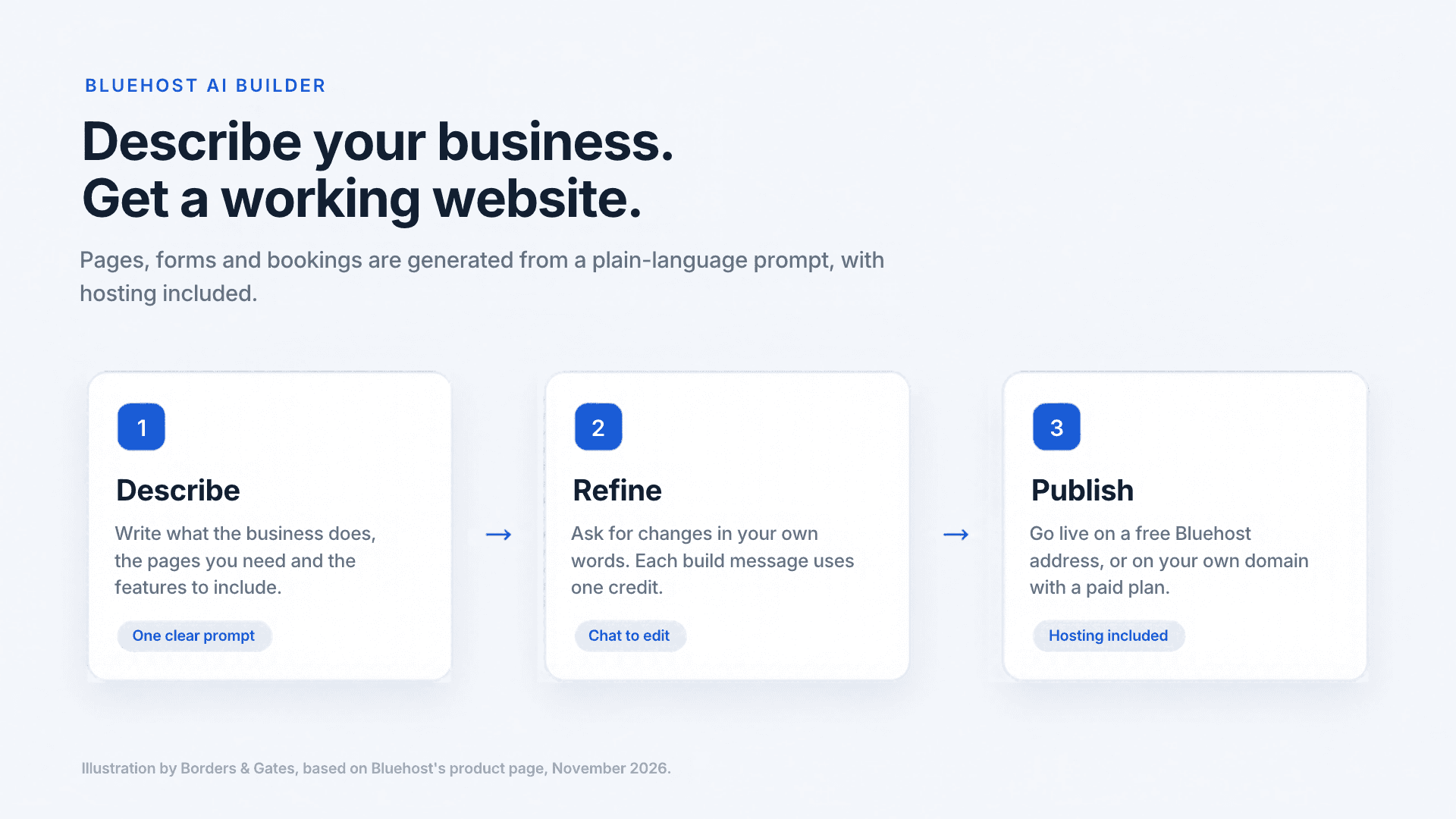
Hosting is included, so there is no separate hosting plan to buy and no database to connect. Bluehost lists 24/7 human support on every plan, including the free one.
Two details are worth knowing before you build something business-critical on it. The product carries an Early Access label on Bluehost's page, so plans and pricing may change. And it builds websites and web apps only: Bluehost states that it does not build native apps for the Apple App Store or Google Play at this time.
It suits founders and small teams who want a working site quickly, with forms, bookings and user accounts handled inside the same platform.
A prompt for a booking site, and what to check in the result
A booking page is a practical first test of any AI builder, because it shows whether forms, dates and confirmations work together. Bluehost lists bookings and scheduling as part of the free plan. A clear prompt gives the best first version. Here is one you can adapt:
“Build a website for a small consulting studio. Include a homepage with a short introduction, a services section with three services, and an online booking page where visitors choose a service, a date and a time, and enter their name and email.”
When the first version appears, check five things before you spend any credits on refinements:
Five things to check
Submit a test booking and confirm you see a confirmation.
Know where booking requests arrive: an admin panel, an email alert or both.
Check each page's title, description and headings. They are what search engines read first, and generic wording will not help a page stand out.
Replace generic phrases with your real services and location.
Open the site on a phone before you share it.
Each message that creates or changes your site uses one credit. Questions, publishing and hosting do not, so batch your changes into one clear request instead of many small ones.
What the free plan includes, and what it does not
According to Bluehost's pricing page, the free plan costs $0, needs no credit card and has no end date. It includes:
- Unlimited websites and apps
- Forms and data storage
- Bookings and scheduling
- User accounts and roles
- An admin panel
- A free Bluehost address ending in .app.bluehost.ai
- Cloud hosting
- 24/7 human support
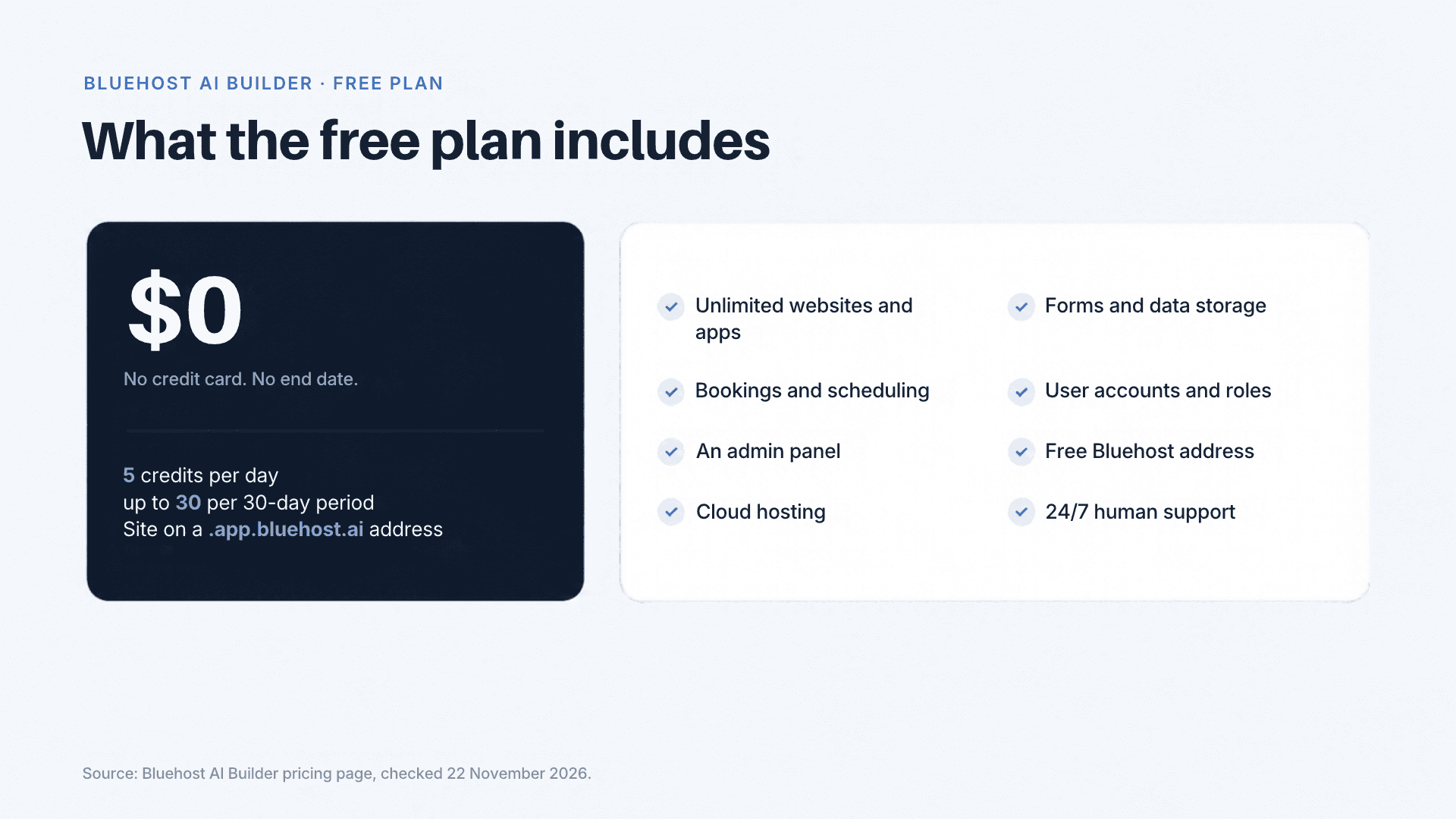
- The limit is credits: 5 per day, up to 30 per 30-day period. Treat it as a budget, not a daily allowance. Five credits a day reaches the 30-credit cap in six days, and because each message that creates or changes the site costs one credit, the free plan covers at most 30 build messages in a 30-day period. Plan your changes before you start.
- Hosting does not use credits, so a site you have already published stays online when your credits run out. Running out only pauses new changes.
Limits that matter for a business site
- **The address.** The free site publishes on a Bluehost address, not on your own domain. Bluehost's FAQ states that this address is not indexed by search engines.
- **The badge.** Bluehost lists removal of its badge among the features of the paid Lite plan.
- **Working alone.** You cannot invite others to work on a project at this time. You can share a view-only link to the published site.
- **Email.** Sending email from a Bluehost mailbox is not available in Bluehost AI Builder at this time.
- **Monitoring.** Bluehost does not send alerts if a published app stops running, so check the live site on a regular schedule.
For testing an idea, building a draft, or showing a client a working version, the free plan is enough. For a public business site, you will want the paid step.
How to connect a custom domain
A custom domain, such as yourcompany.com, needs a paid plan. The steps are straightforward:
- Build and refine your site on the free plan.
- Upgrade to Bluehost AI Builder Lite, the first plan that includes custom domains.
- Connect the domain you own, or register a new one. Registration and renewal are billed separately from the plan.
- Publish the site on your domain.
Sites built with Bluehost AI Builder are served over HTTPS automatically, on the free address and on your own domain, so this route does not need a separate certificate. On a newly connected domain, activation can take a short time. If you host elsewhere, our comparison of Bluehost vs SSLs.com covers certificate choices.
What happens if you cancel
The paid plan is what keeps the site on your domain. If you cancel, Bluehost disconnects the custom domain and the site stays published on its free address. The domain remains registered to you, and your projects and chat history are kept. Because the free address is not indexed, organic search traffic to the site stops. You can upgrade again and reconnect the domain, but it is not reconnected automatically.
Downgrades are not available inside the builder. Moving to a smaller plan, or back to Free, means contacting Bluehost Support.
Will Google rank a site built with AI?
Google's Search Central guidance says that using automation, including AI, is not a problem in itself. What matters is whether the content is helpful and made for people rather than to manipulate rankings. A site built with an AI builder can rank, and a poor site can fail to rank whatever tool made it.
What decides your results is the same as for any site:
- **A domain that search engines can index.** This is the practical reason to leave the free address. It is not indexed, so it will not bring organic traffic.
- **Content specific to your business.** Describe your services, your location and your customers in your own words, not in generic copy.
- **Clear page structure.** Titles, descriptions and headings should say what each page is about.
- **Search Console.** After you publish on your domain, add the site to Google Search Console and submit the pages for indexing.
What it costs
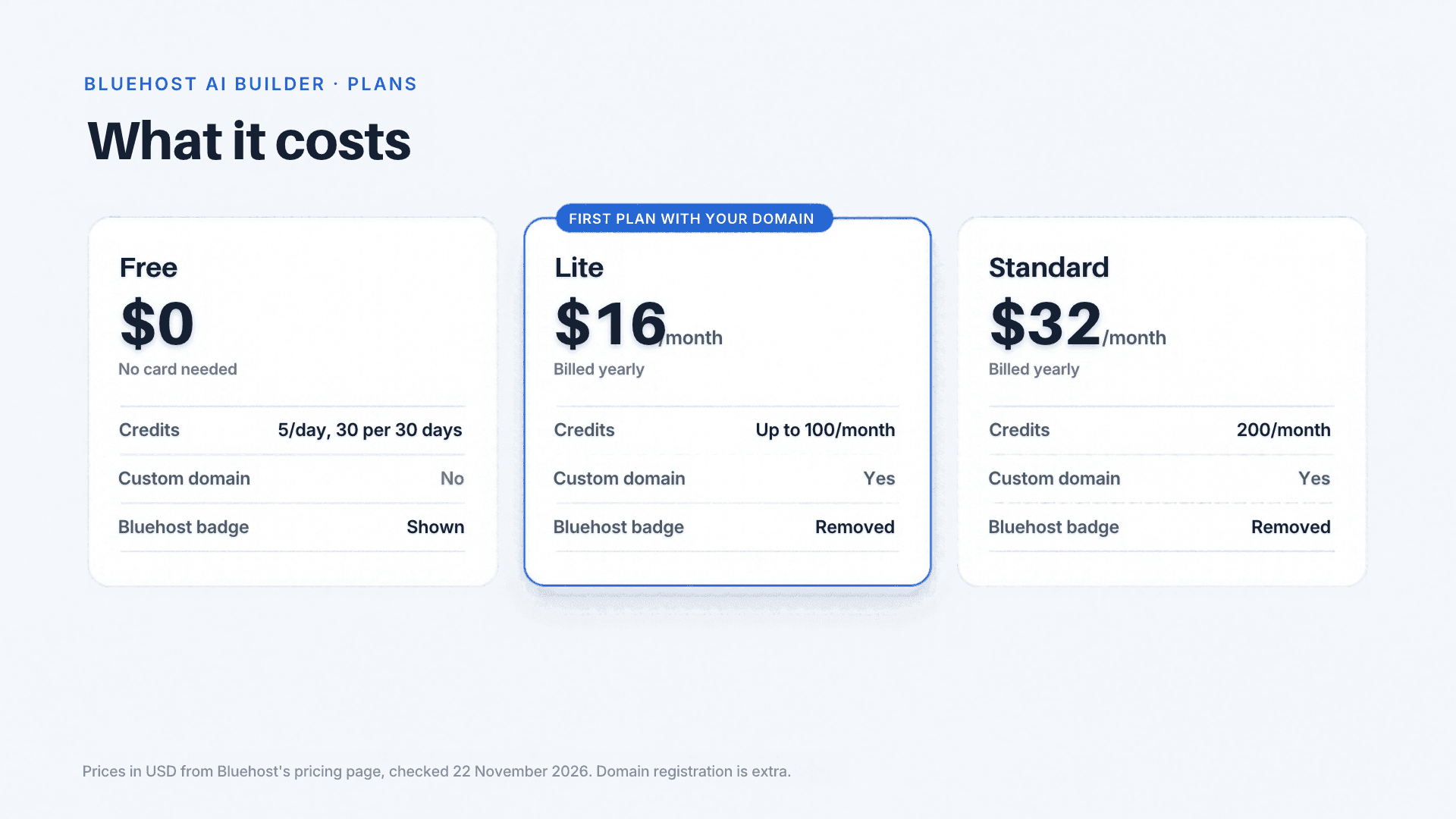
| Plan | Price | Credits | Custom domain | Bluehost badge |
|---|---|---|---|---|
| Free | $0, no card | 5 per day, up to 30 per 30-day period | No (Bluehost address) | Shown |
| Lite | $16 per month, billed yearly | Up to 100 per month, no daily limit | Yes | Removed |
| Standard | $32 per month, billed yearly | 200 per month | Yes | Removed |
Prices are in USD from Bluehost's pricing page, checked on 22 November 2026. The page shows yearly billing, with a yearly total of $240 for Lite and $480 for Standard. Bluehost's help center says you can also pay monthly, so check the final price at checkout. Plan credits and top-ups expire after 30 days, and top-ups are available on every plan, including Free. A domain you register is an extra cost. The help pages also mention a higher-volume Pro tier with 400 credits a month, which was not on the pricing page when we checked.
**Our read on the numbers.** Standard costs twice as much as Lite and gives twice the credits, so it buys volume, not a discount. Choose by how many changes you expect to make in a month. For a single small business site, Lite is usually enough to start. The pricing page lists a year of Lite at $240, billed upfront, before any domain registration.
When an AI builder is not enough
An AI builder is a strong fit when you need a clear site, a booking or quote flow, and speed. It is a weaker fit when the project needs:
- **Native mobile apps.** The builder creates websites and web apps, not native iOS or Android apps. That is a job for mobile development.
- **Custom integrations.** Connections to your CRM, accounting system or internal tools usually need software development.
- **A large or multi-market site.** Several languages, regions or user types call for planning before building, which is where web development starts.
- **Brand-led design and messaging.** A launch that depends on a distinctive identity benefits from UX/UI design and strategy work.
- **An online store.** Bluehost sells a separate product, AI Store, for selling online. To compare platforms first, read our guide to Shopify vs WordPress for eCommerce.
An AI-built draft can also work as a clear brief for a custom build, because it shows exactly which pages and flows you need. For those projects, Borders & Gates builds fully customized websites and software, designed around how each business operates and scales. If your project is heading that way, talk to our web development team.
Sources
- Bluehost, Bluehost AI Builder pricing and plans
- Bluehost Help, Plans, Credits, and How Credits Work
- Bluehost Help, What Is Bluehost AI Builder?
- Bluehost Help, Frequently Asked Questions
- Bluehost Help, How to Get Your Website or App Ready for Launch
- Google Search Central, Google Search's guidance about AI-generated content
Frequently asked questions
Frequently asked questions
The free plan costs $0 and needs no credit card. It is limited to 5 credits a day and 30 per 30-day period, and it publishes on a Bluehost address.
No. Custom domains require a paid plan, listed from $16 per month on a yearly plan.
No. Bluehost states that sites on the free .app.bluehost.ai address are not indexed by search engines.
No. You describe the site in plain language and refine it by chatting.
New changes pause until your credits renew, and your published site stays online. You can also buy a credit top-up on any plan.
Bookings and scheduling are listed in the free plan. Test the booking flow yourself before you publish it to customers.
Not at this time. You can share a view-only link to the published site.
Bluehost AI Builder is a fast way to get a working business site live, and the free plan is enough to test an idea or build a first version. Once you need your own domain, search visibility and no Bluehost badge, the Lite plan is the practical next step. If your project needs native apps, custom integrations or a brand-led build, a tailored development partner is the better fit.
We may earn a commission when you buy through links on this page, at no extra cost to you.
Subscribe to our newsletter